Job Management
One view of the work.
Know what is moving, what is missing, and what still needs to be billed.
Software
Field evidence, without the field notebook.
T&M gives restoration teams a faster, clearer way to document the work as it happens — so labor, materials, and conditions stay connected to the story of the job.
T&M walkthrough
A quick look at T&M in action, shown at double speed.
T&M / Capabilities
A working system for documentation, coordination, and billing—whether your team is at a desk, on site, or handing work to a partner.
Job Management
Know what is moving, what is missing, and what still needs to be billed.
Documentation
Capture the details at the source and keep them attached to the job. Use digital documentation, paper, or a combination of both—completely flexible to your needs.
Estimating
A straightforward ROM builder, with a separate guided option when the job calls for it.
HUB & Network
Connect your crew and contractor network without losing oversight of the job.
Clients & Billing
Keep client expectations, costs, and billing preferences close to the work.
Operations & Support
Put practical operating tools around the work—from compliance through changing site conditions.
Job Management
Manage and access company jobs, past and present. Search your jobs, filter by job type, status, or source, and open the record that keeps documentation and billing together—from contract to invoice.
Search & filters · Job status · Current & archived work
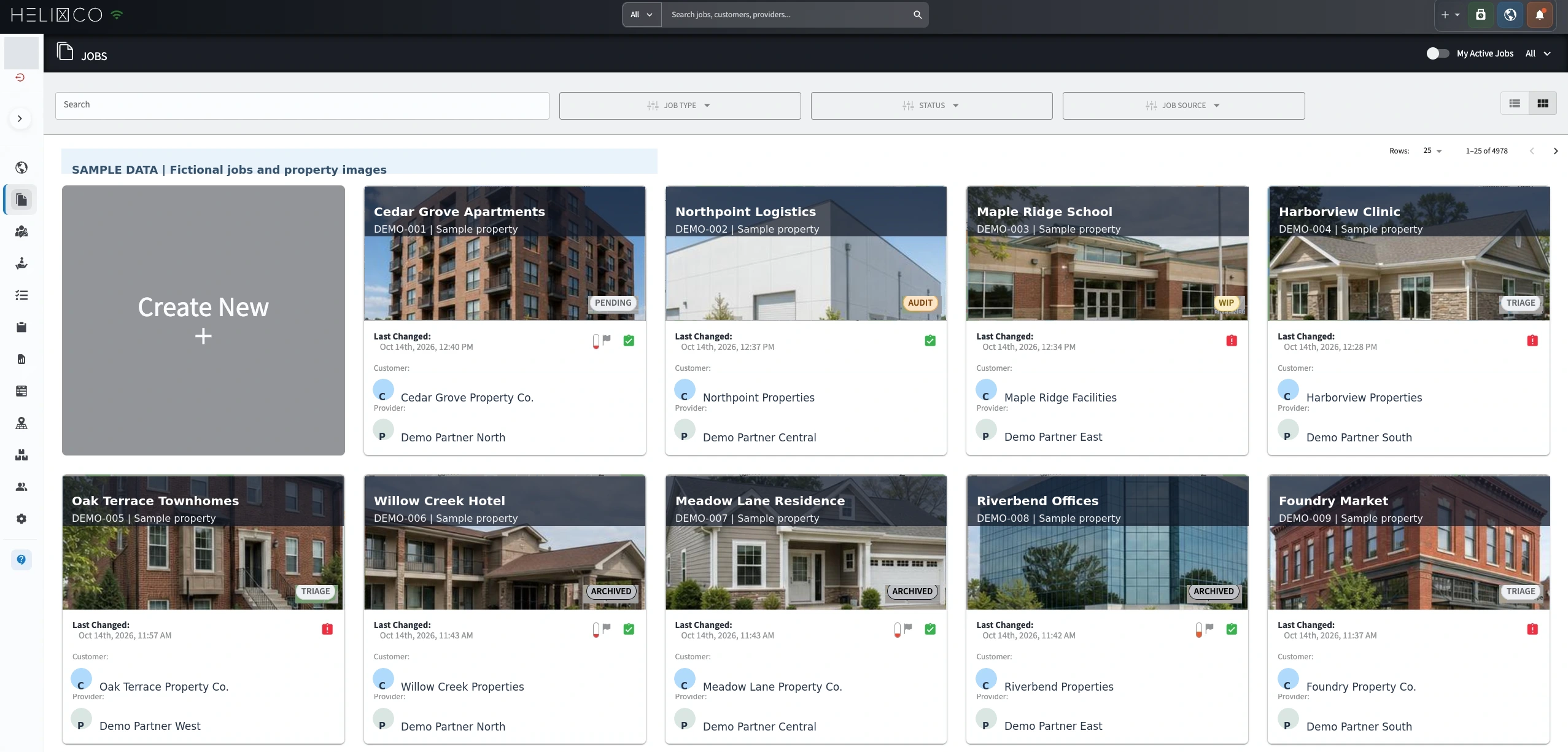 Explore the jobs list at full size
 Job Management
Get an overview of all company jobs and quickly see where data is missing. Financial performance and active work share the same view, with job value, revenue billed, blended gross margin, and job mix by type.
Financial performance · Gross margin by job type · Jobs by type
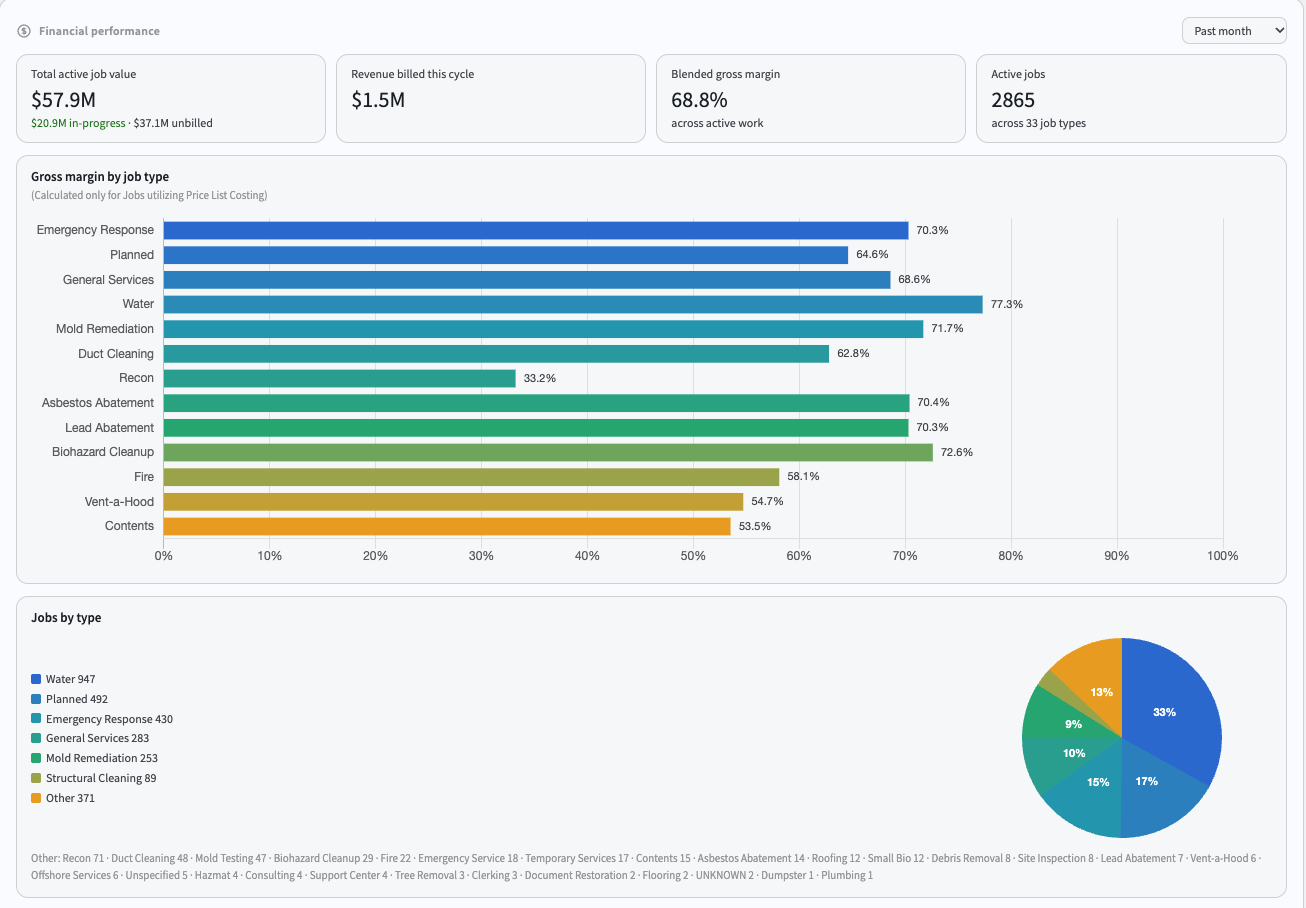 Explore the dashboard at full size
 Job Management
Give the work ahead a clear structure. Tasks and milestones bring day-to-day activity and the larger stages of a job into your T&M project management workflow.
Use tasks to break the job into practical pieces of work. Keep the next steps in view as your team moves through the project.
Use milestones to mark key points in the job. They give progress a broader context alongside the individual tasks and the job schedule.
Documentation
Capture the details at the source and keep them attached to the job. Use digital documentation, paper, or a combination of both—completely flexible to your needs.
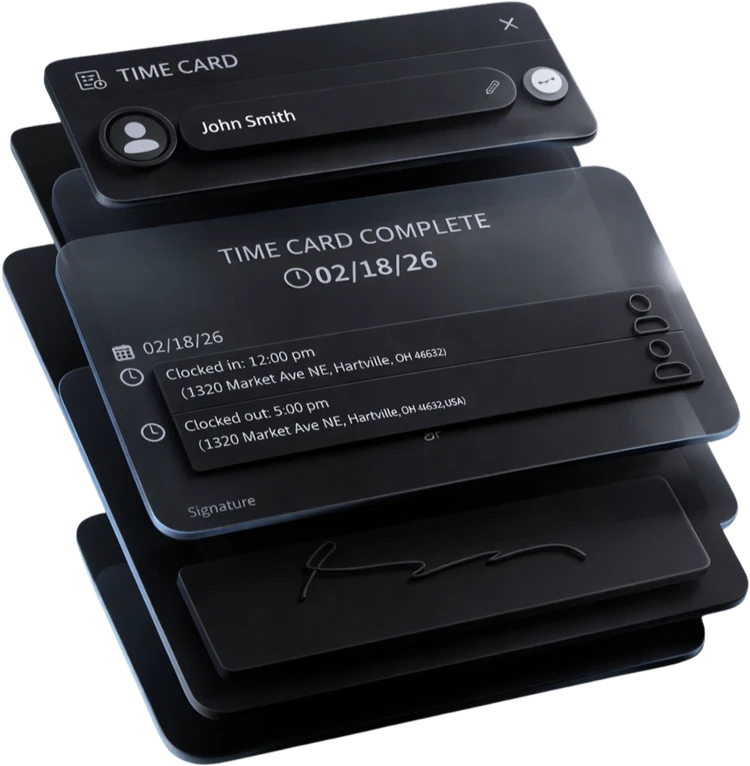
Digital clock-in records capture a photo, e-signature, time, date, and geolocation. Clock-ins and photos are time/date-stamped and geolocated, creating useful context when workers share the same name.
A photo is captured as part of digital clock-in.
The entry and photos are time/date-stamped.
Location is recorded with the digital clock-in.
A signed record is attached to the clock-in.
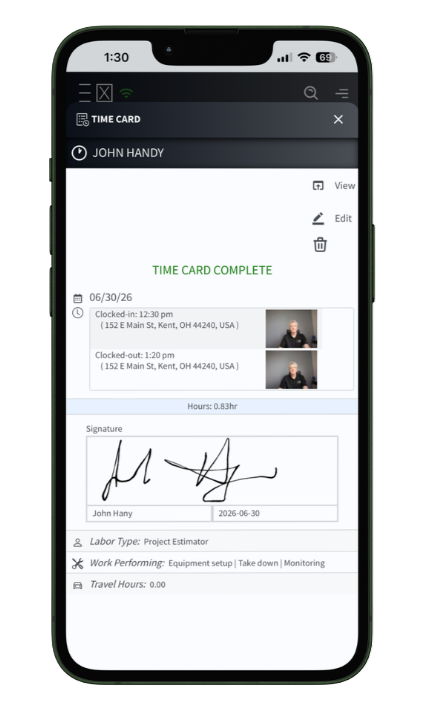 View the full time card
 Documentation
Add visual callouts and text labels directly to job photos. Highlight an area of interest and give your team the context behind the image, keeping the annotated photo with the project documentation.
Photo annotations · Text labels · Project context
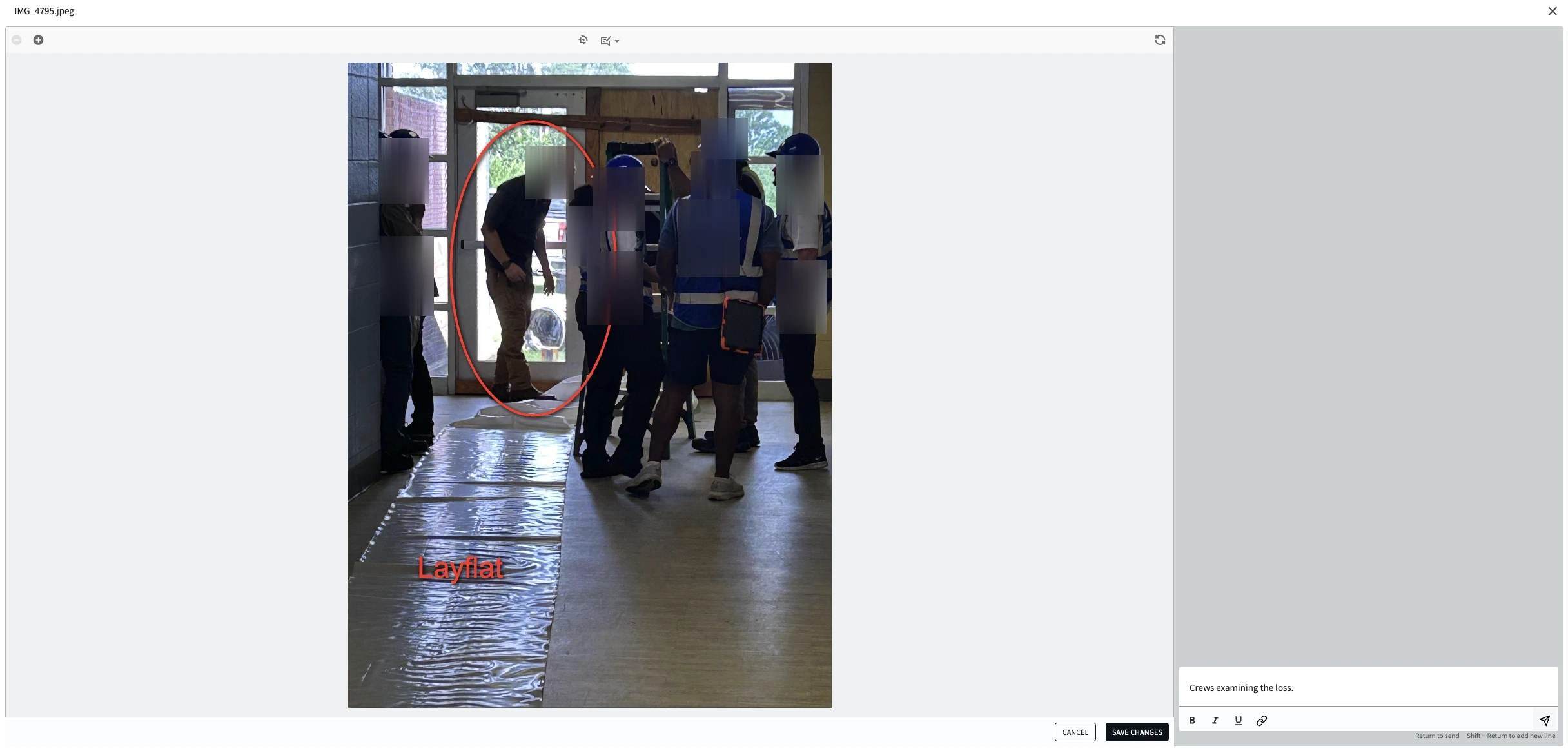 Explore the photo annotation example at full size
 HUB & Network
HUB brings staff and other contractors in your network into reach, with a staff directory, custom groups, and vendors. The job discussion board can send outgoing email while keeping the communication documented in the app.
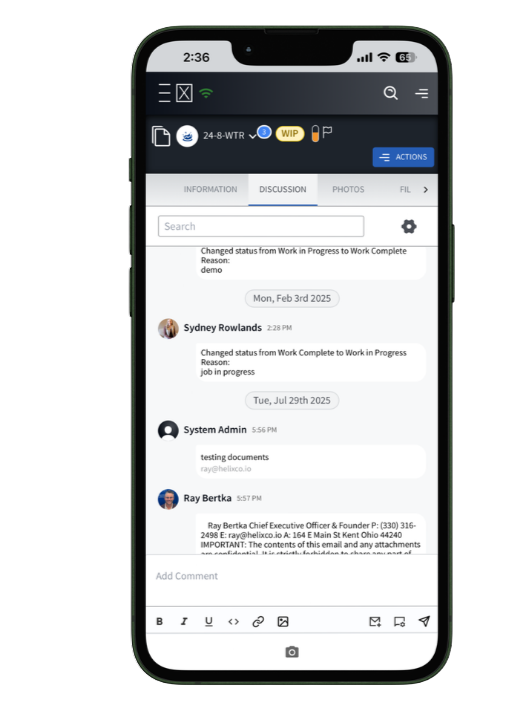 Job discussion
 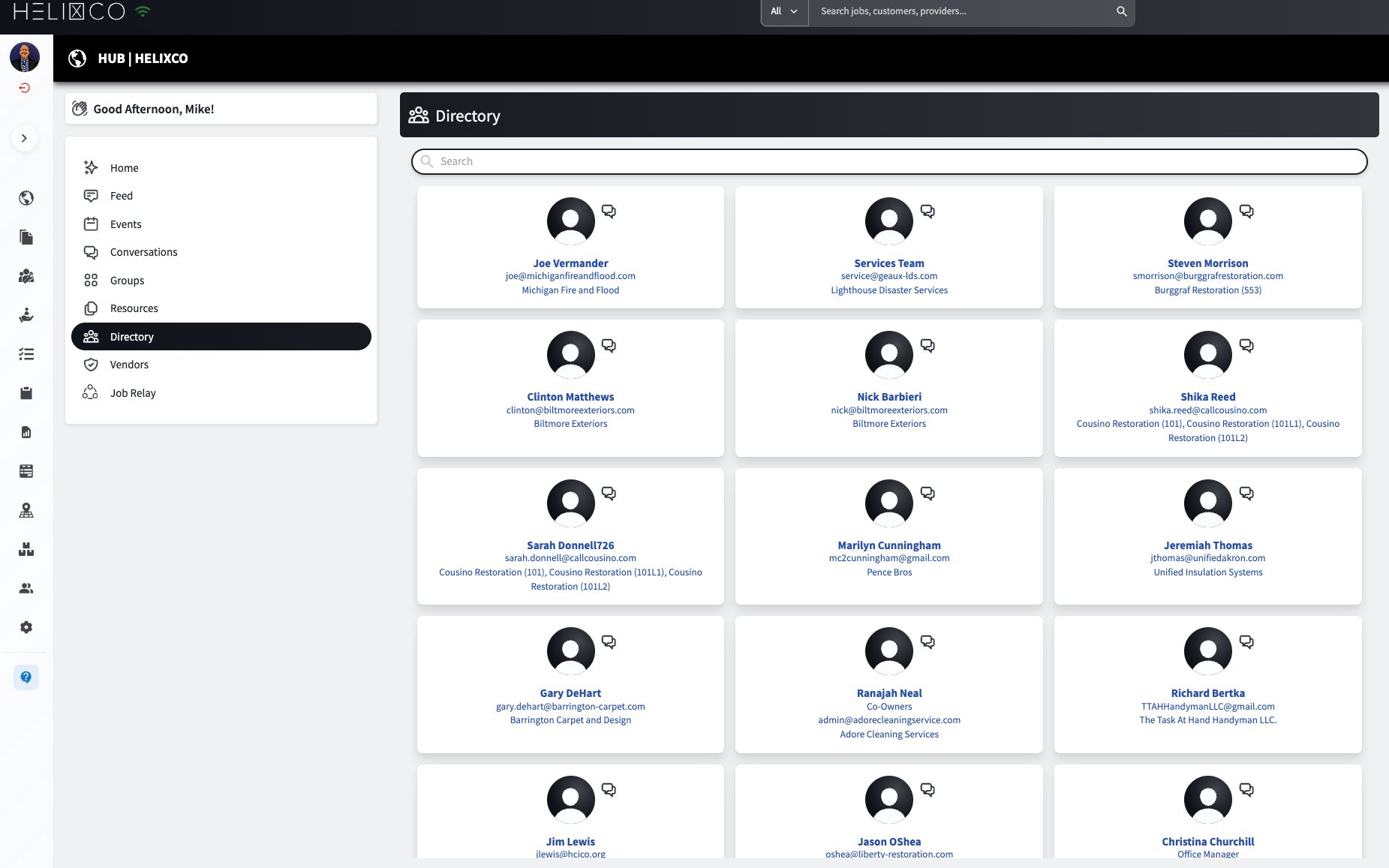 Explore the Hub directory at full size
 Clients & Billing
Create unlimited client profiles with each client's custom terms and conditions and price lists, alongside location context, contact information, and contact history.
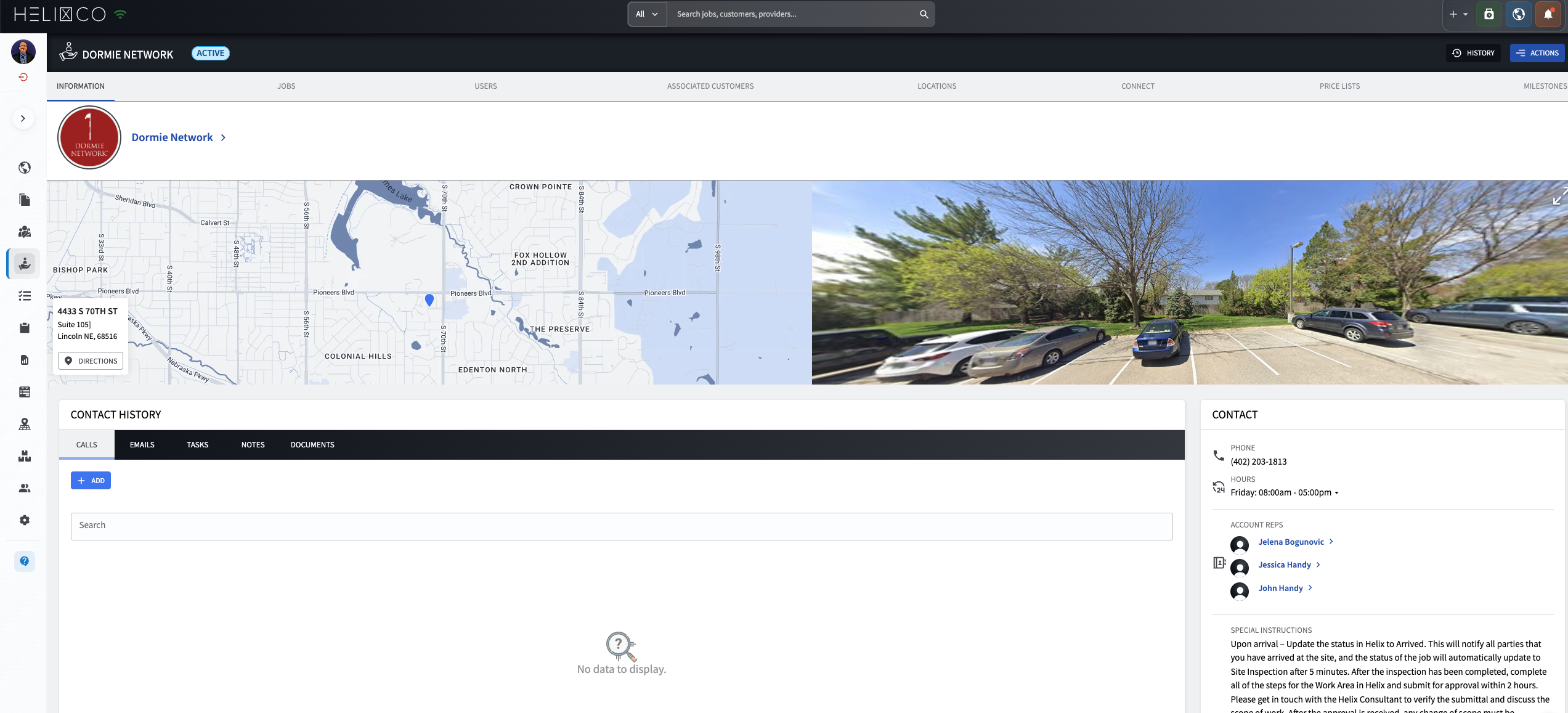 View the client profile at full size
 Clients & Billing
Keep clients informed as the work progresses. Client sharing brings job information into the conversation, giving your team and the client a clearer starting point for project updates.
Share job information to help explain where the work stands. Use that context when discussing progress and the next stages of the project with your client.
Keep client updates connected to the work being discussed. Sharing provides context for those conversations; client profiles and invoicing address the separate terms and billing details.
Operations & Support
See how the job is taking shape over time. The schedule brings multi-day work and individual events into the same calendar view, keeping planned activity easy to follow.
Calendar view · Multi-day work · Job events
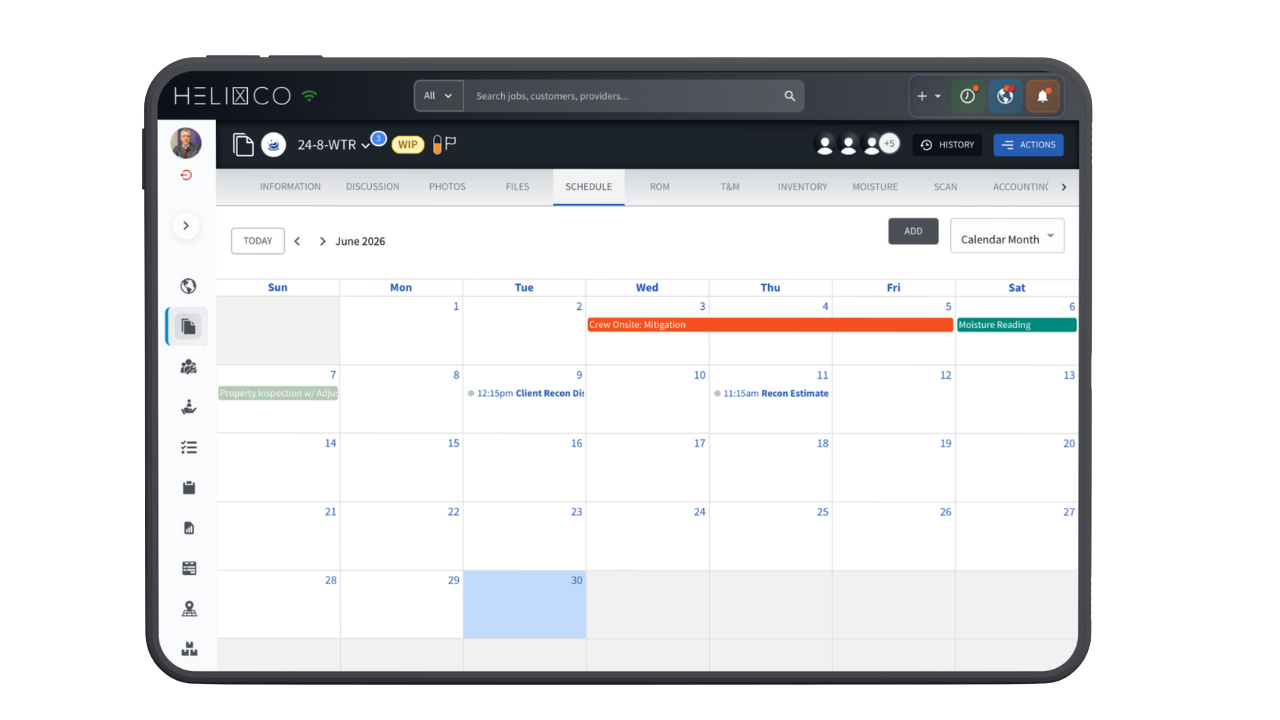 Explore the schedule at full size
 Documentation
Keep room-level moisture readings in view, see progress toward dry, and connect the map to the work happening on site.
Plot readings by room to make the changing conditions easier to follow.
Review the drying trend alongside each material’s average and goal.
Use sketch tools and equipment recommendations to add job context.

Clients & Billing
Keep job financials in view alongside the work. See days validated, remaining value, and total NTP above a timeline chart, with overall and labor summaries below.
Validation progress · Financial timeline · Labor summary
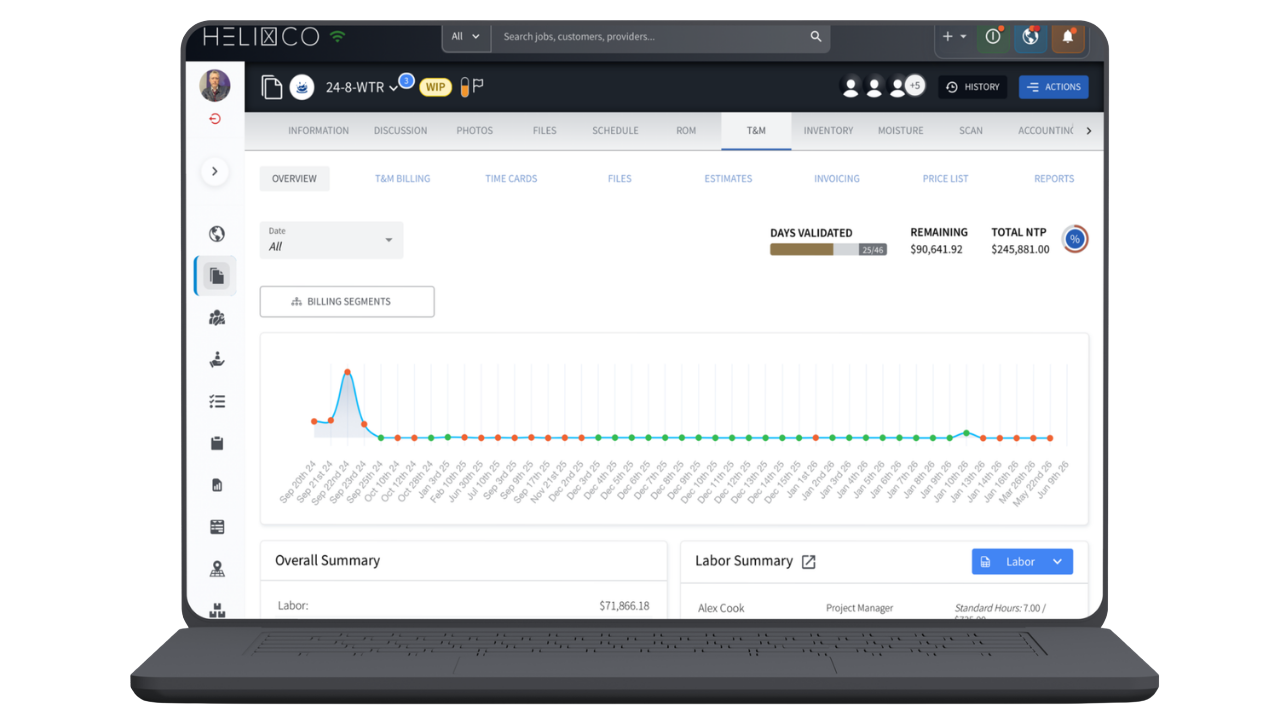 Explore the financial tracker at full size
 Operations & Support
Put geography in context. A mobile weather map shows alert coverage across regions, while the desktop view shows location clusters alongside weather activity—bringing the places and conditions around the work into view.
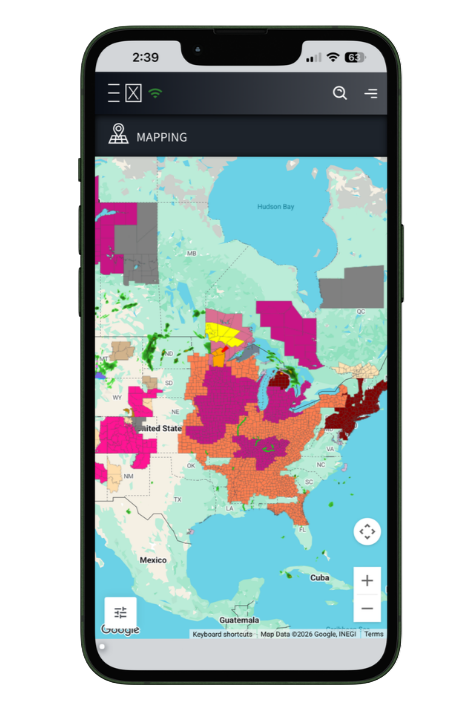 Weather coverage
 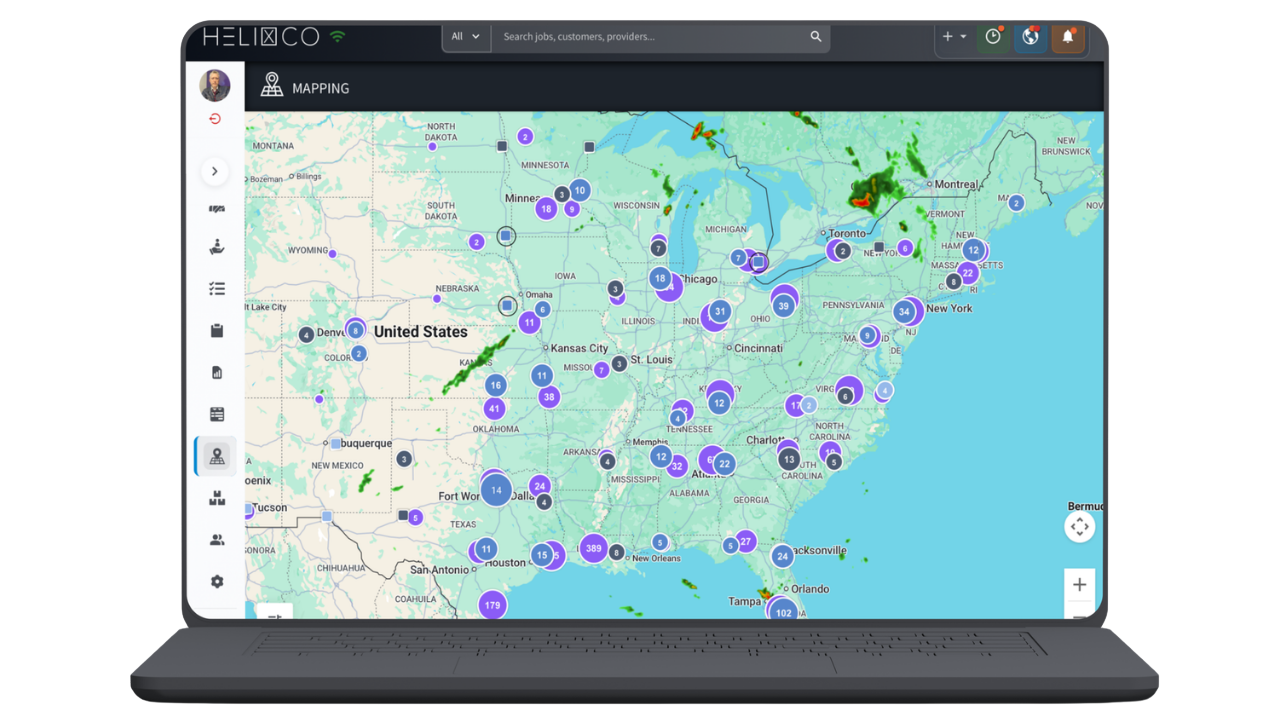 Job & customer geography
 Estimating
Keep the details behind the bill in one view. The ROM record shows job information and scope of work beside cost and profit totals, with recent notes and tabs for services, inventory, files, and photos.
Job details · Totals · Recent notes
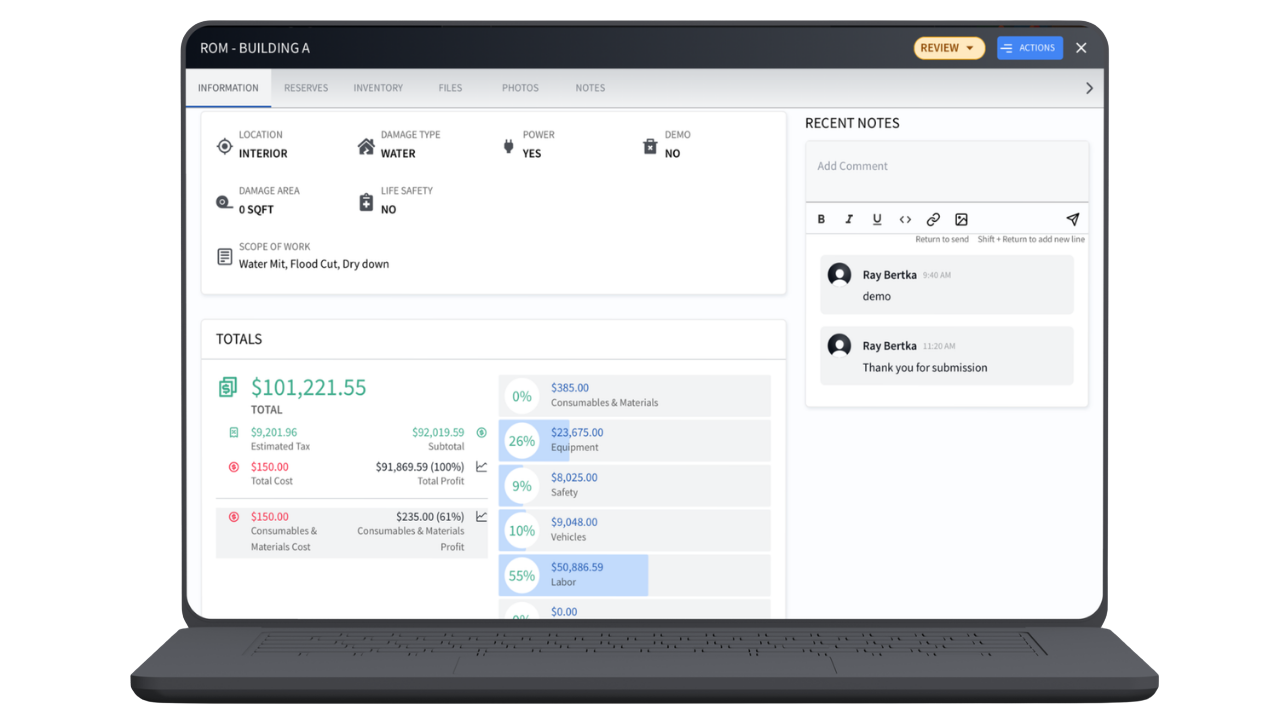 Explore the job record at full size
 Estimating
Optional add-on · Additional cost
Go beyond the ROM builder with a guided series of questions. ROM Wizard uses IICRC standards to build the scope and your own price list to build the estimate, with a document preview and detailed scope for review.
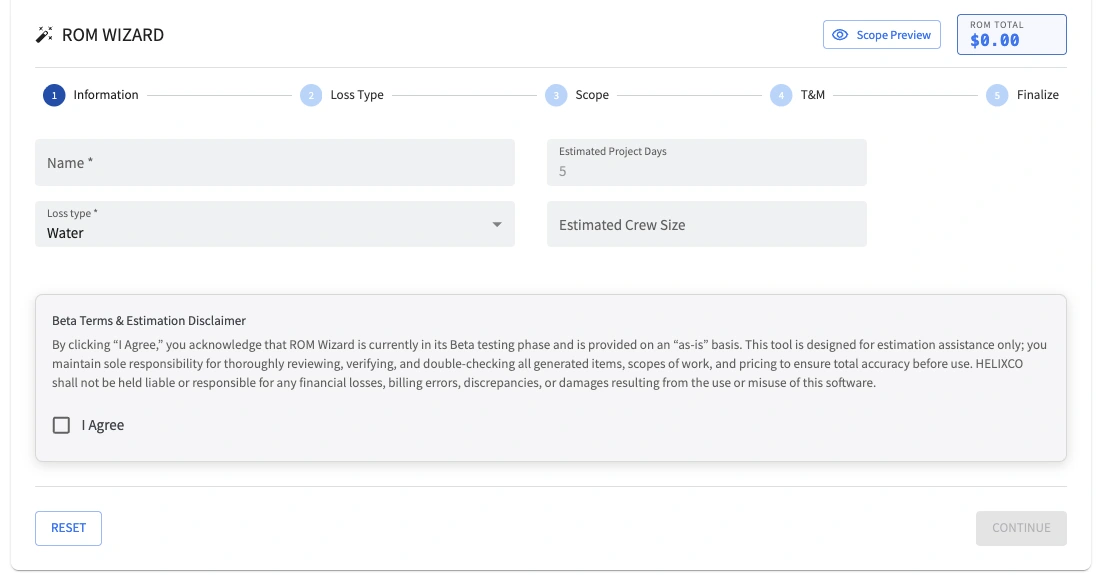
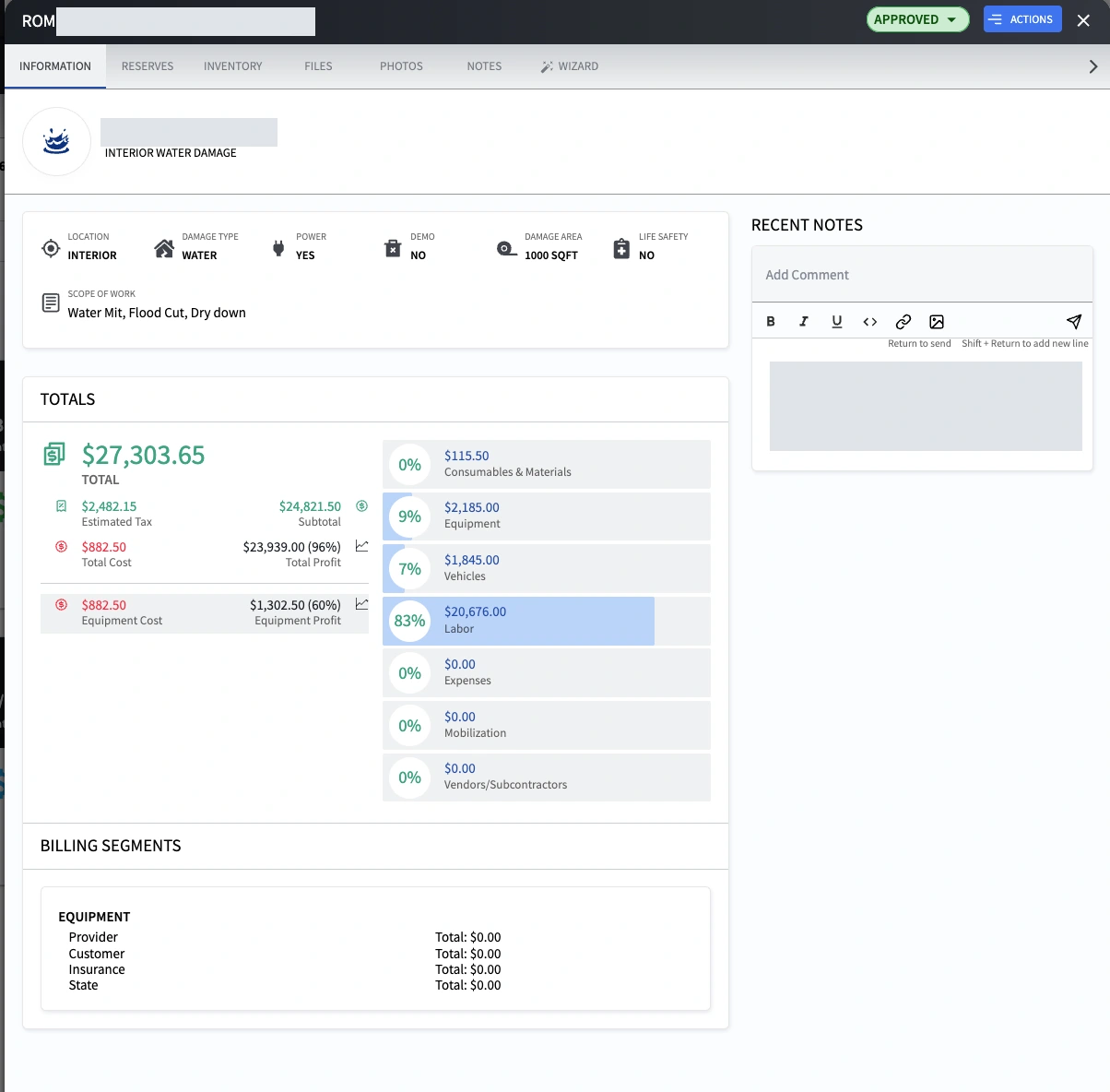
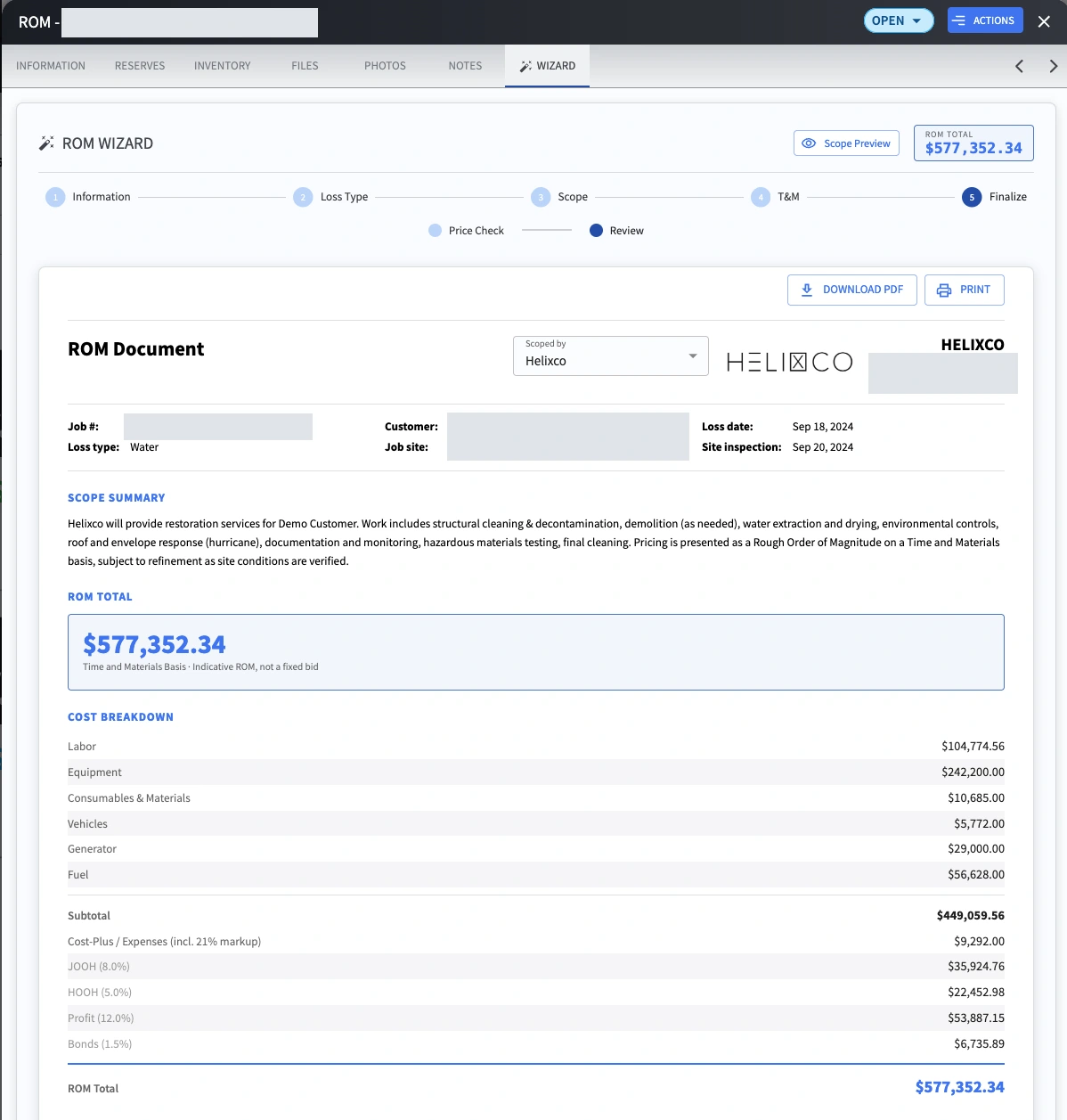
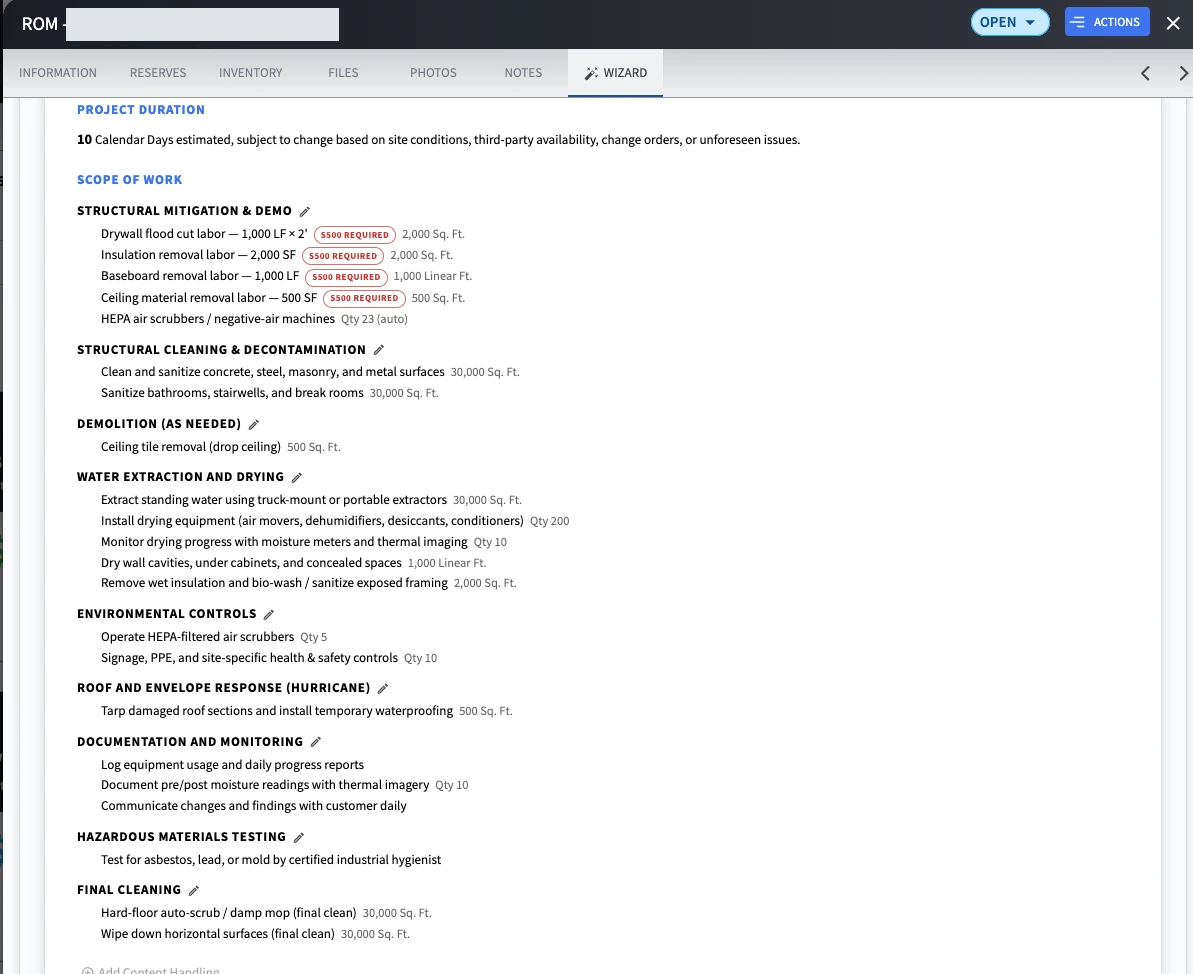
Separate example records are shown, not a single job’s progression. Project identifiers, addresses, and a private note have been redacted.
Clients & Billing
Merge files and manage allocations across multiple jobs with ease, keeping related work organized and billing clear.
Keep grouped work and billing records in view. The ROM screen shows approval progress, estimate, cost, and profit across job areas; the invoicing screen lists billed amounts, statuses, and billing segments.
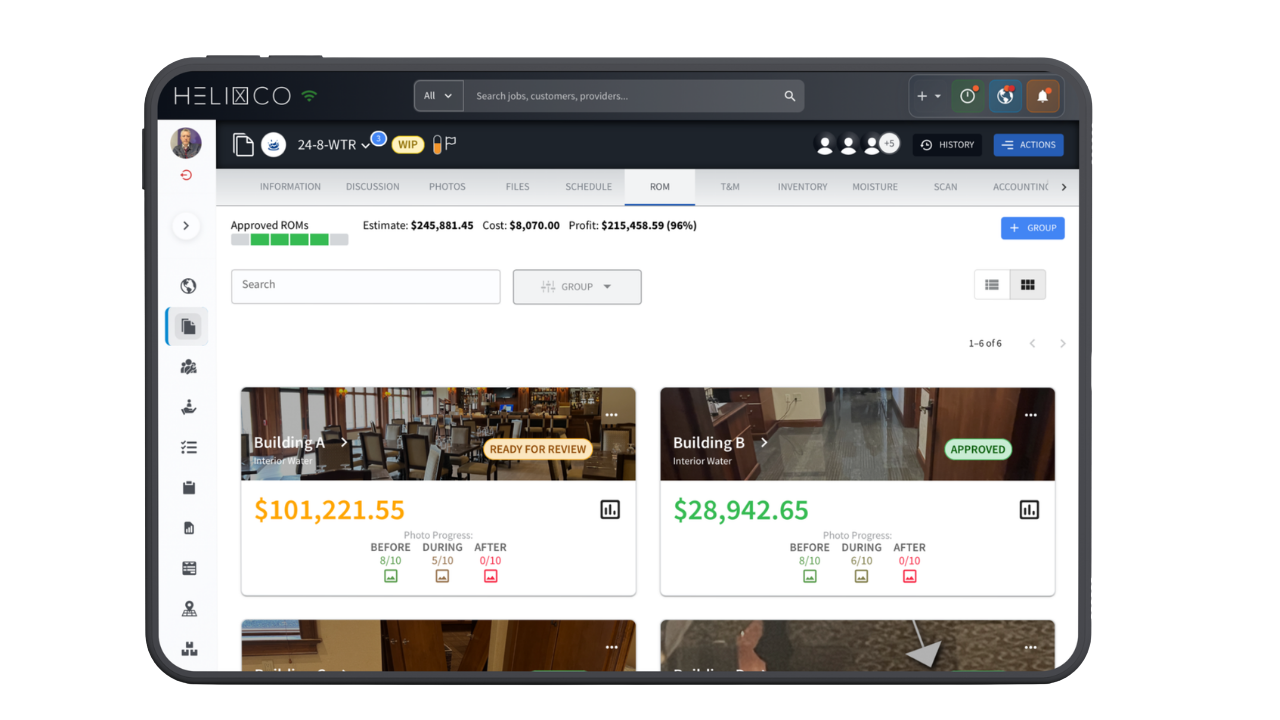 ROM groups & divisions
 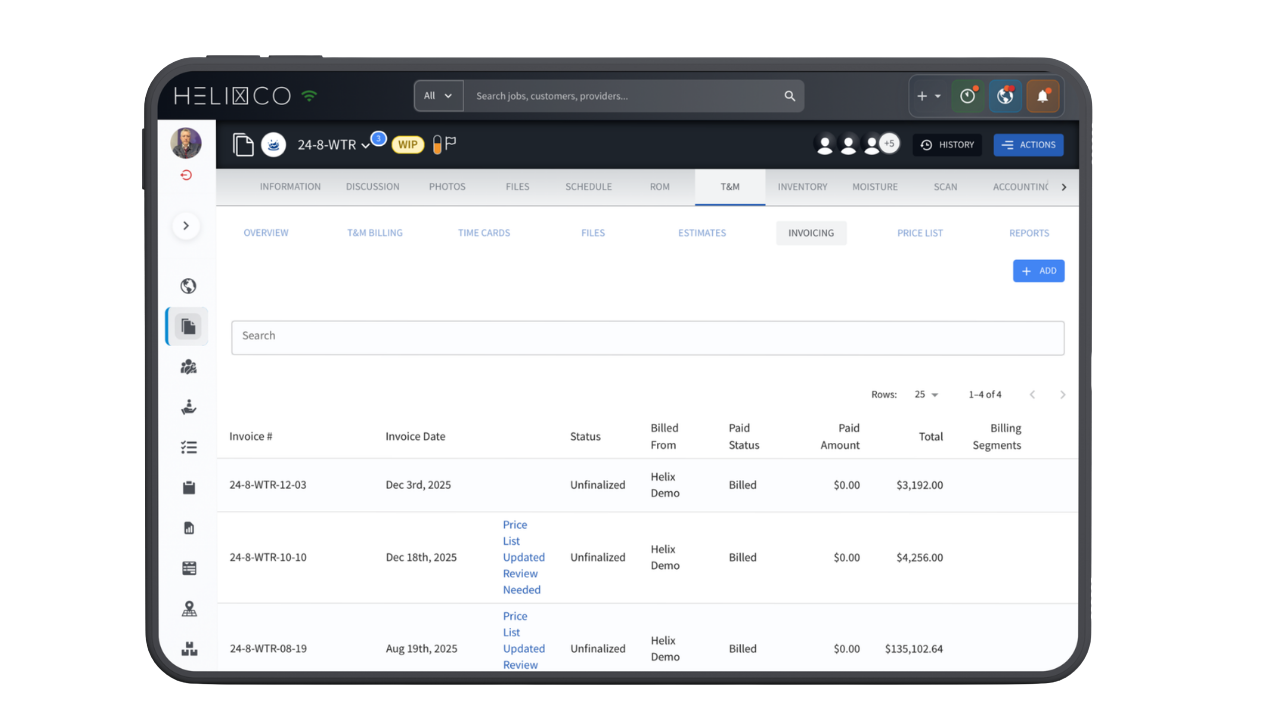 Invoicing & billing segments
 Documentation
Organize and store all project files alongside digital forms, digitized paper records, photo reports, and signed documents such as contracts. Voice-to-text is built into every document in the system.
Forms · Documents · Photo reports · Signed records
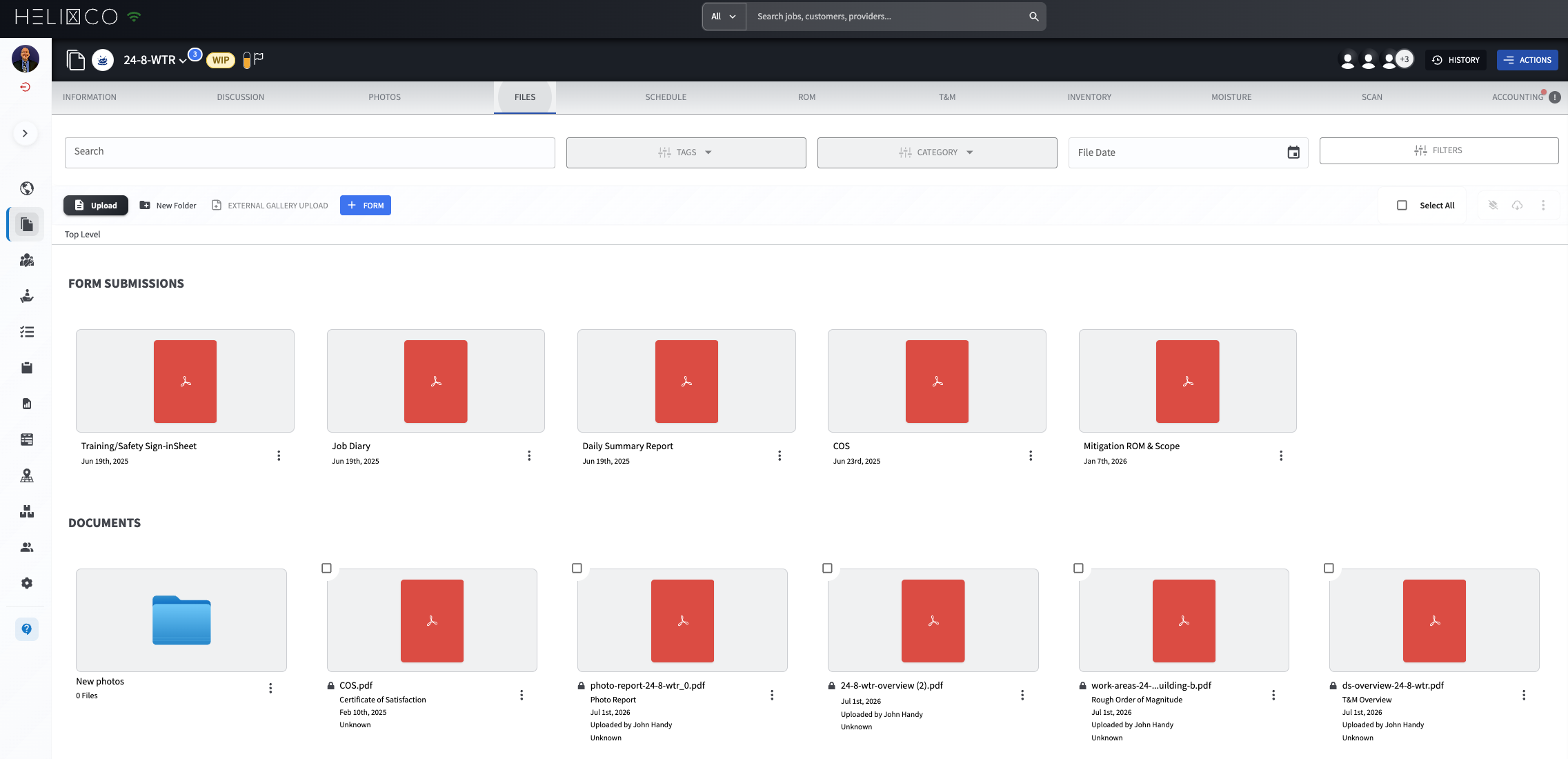 Explore the Files view at full size
 Documentation
Connect DocuSketch, Matterport, or magicplan drawings to the job for virtual walkthroughs. Project files keep the visual record and related plans together.
360° view · Floor-plan sketch · Site context
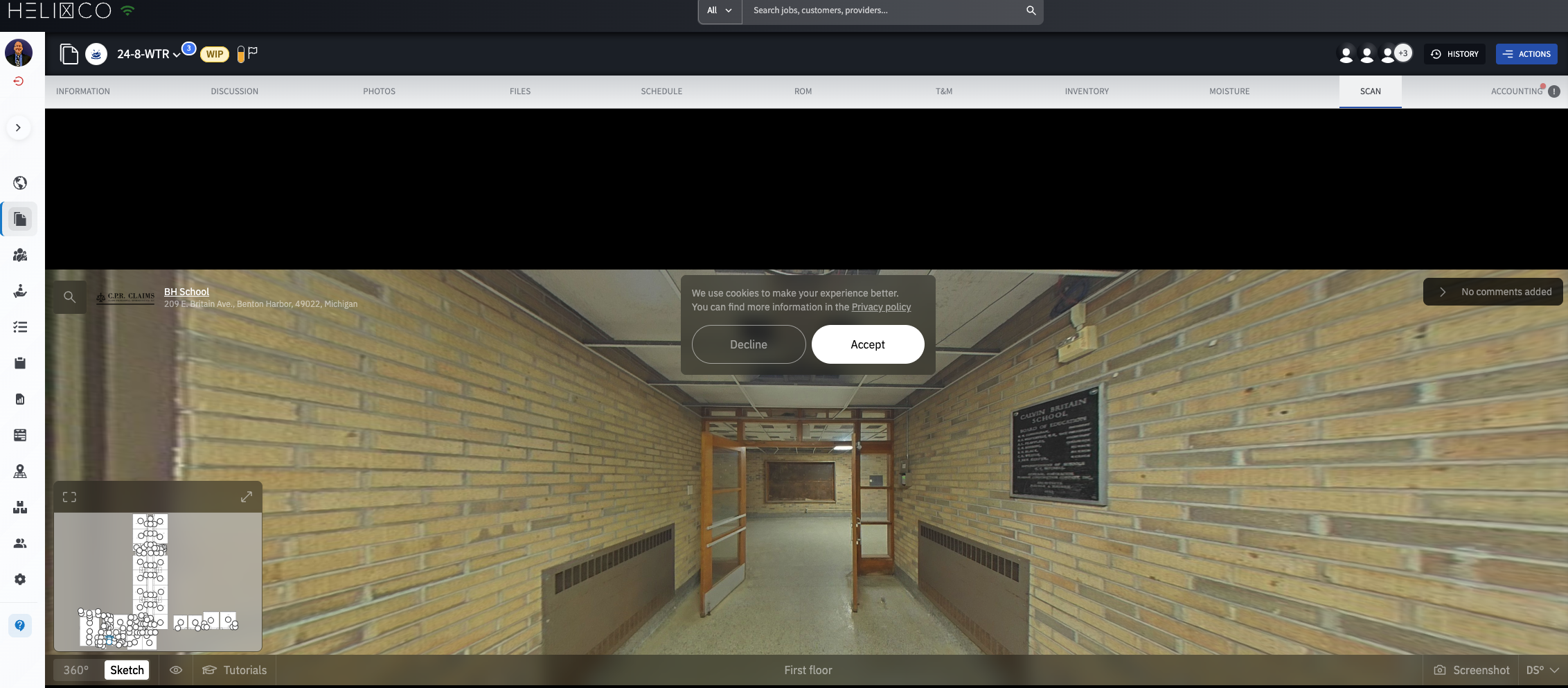 Explore the scan view at full size
 HUB & Network
Start by finding a partner where you need help. The provider map shows network locations so you can identify a contractor near the work. Then use Job Relay, accessed through HUB, to assign a complete job or a portion of one while retaining oversight.
Find a local partner · Assign work · Maintain oversight
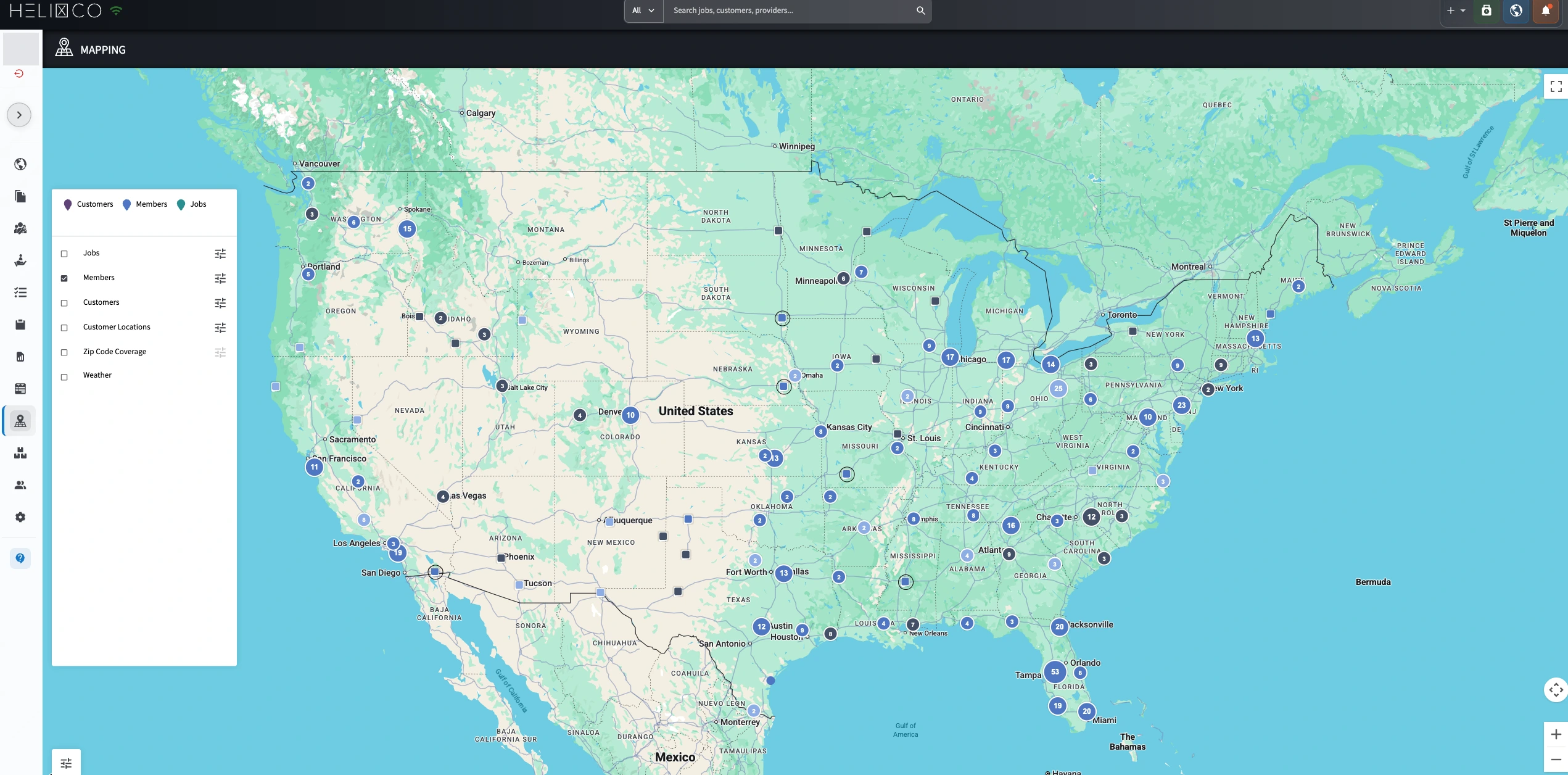 Explore provider locations at full size
 Operations & Support
Keep subcontractor and partner compliance in view. Filter providers by status, review changes and dates, and see status by state and region. Customizable compliance tasks help your team manage the requirements that matter to each relationship.
Status filters · Change history · Partner compliance
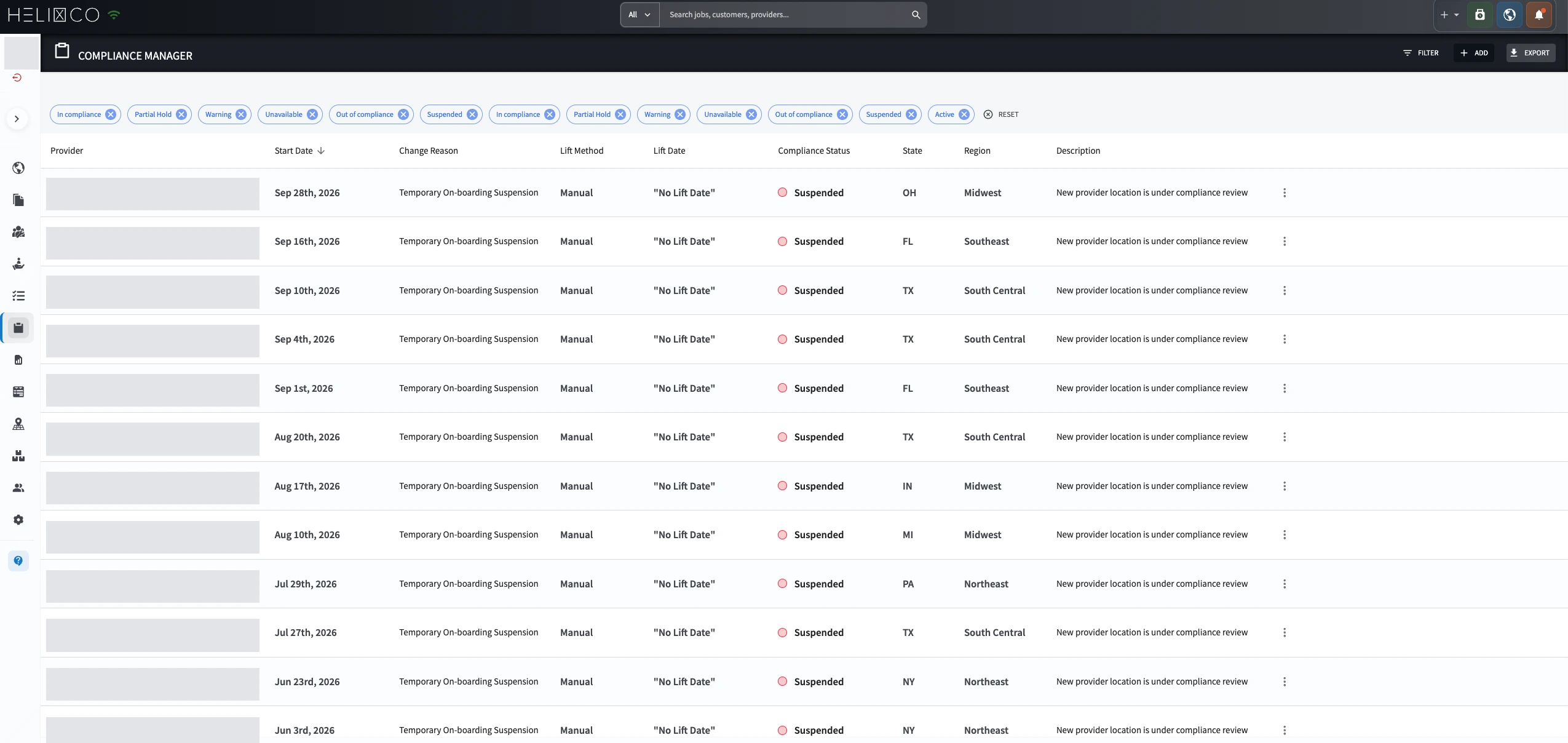 Explore the compliance view at full size
 Operations & Support
Get help from a person when you have questions about using T&M. Live support gives your team a place to talk through the software and the workflow you are trying to complete.
Bring questions about using the software to a live support conversation, whether you are working through documentation, project management, or billing.
Explain what you are trying to do and where you need help. That context gives the support conversation a practical starting point for your team.
Why teams use T&M
Time-stamped notes, photos, and materials stay together from the first visit through closeout.
Give project managers and carriers a consistent record of what happened, where, and when.
A practical field flow means better documentation without adding another heavy admin task.
How it moves the work
Keep time, materials, equipment, and site conditions tied to the work as it happens.
Pair field notes with photos and scope continuity so context does not disappear between visits.
Turn jobsite reality into a clean, client-ready record your team and carrier can stand behind.
Made for the people in the handoff
T&M gives the people closest to the work a shared starting point, so each role can contribute context instead of recreating it.
A clearer view
Explore the interface and the moments this tool is built to make easier.
T&M makes the work easier to explain because the record grows with the job, not after it.
T&M

“After working with several ROM estimating tools in the restoration industry, I can confidently say that Helix’s ROM Wizard stands out. A common challenge with other platforms is reliability, but Helix has consistently produced ROMs that align closely with—and are sometimes slightly above—our final Time & Material invoices. Whether we’re evaluating a large commercial loss or a smaller mitigation T&M project, ROM Wizard helps us build dependable budgets in a fraction of the time traditionally required. It’s intuitive, easy to use, and highly practical. In an industry where time matters, Helix has created a tool that streamlines our work and gives us greater confidence in the numbers we present to clients.”
Steve R. BeardVP of Mitigation, The Natl Catastrophe Team & Consumer Direct ServicesApex Restoration DKI

Implementing Helix's Time & Material billing software has been a game changer for our restoration company.
Before Helix, our team spent countless hours chasing down paper documentation, handwritten equipment logs, work authorizations, and technician notes before we could even begin invoicing. That process often delayed billing and created unnecessary administrative work.
Now, our invoices are being built in real time as the work is performed. Our technicians document everything in the field, and the information flows directly into the job, eliminating duplicate data entry on the back end. Instead of spending hours recreating the job from paper records, our office staff simply reviews and finalizes the invoice.
The biggest benefits we've experienced include:
- No more chasing paper documentation from technicians.
- Real-time job documentation that builds the invoice as work is completed.
- Elimination of duplicate data entry, saving significant administrative time.
- Faster, more accurate billing, allowing us to invoice customers sooner.
- Improved documentation that gives us greater confidence in our billing and supports every charge.
As a restoration contractor, speed and documentation are everything. Helix has streamlined our workflow, reduced administrative burden, and helped us get invoices out the door much faster. It's one of the most impactful software improvements we've made to our business.
I would highly recommend Helix to any restoration company looking to improve efficiency, reduce office workload, and accelerate their billing process.
Samantha MitchellAmerestore

We've been using Helixco for our operational data tracking and invoicing, and it's become an important part of our daily work. The system is easy to navigate, user-friendly, and simple for our team to learn and use.
One of the features we appreciate most is being able to keep all of our project documents in one place. Whether we're in the office or out in the field, we can quickly pull up project information whenever we need it. It keeps everyone on the same page and makes it much easier to stay organized.
The system has helped us keep track of our operational data and made our invoicing process much more efficient. We know we can count on it to support our day-to-day operations.
One of the best parts of working with this team is the customer support. They're always friendly, quick to respond, and happy to help whenever we have a question or need assistance.
We would definitely recommend this system to anyone looking for an easy-to-use, reliable solution with great customer support.
Michelle DavisENV ControllerAmerican Safety
“We’ve been using HelixCo for nearly two years to manage our time-and-material (T&M) projects, and the software has been fantastic. It has significantly streamlined our large-loss operations, saving our team valuable time on the back end while improving the overall experience for our clients. Beyond the software itself, the level of customer support is truly impressive. The HelixCo team is responsive, knowledgeable, and genuinely invested in our success. It has become an invaluable tool in how we manage our large-loss projects.”
Ashley LewisWrightWay Emergency Services

“One of the biggest challenges in our industry is keeping everyone on the same page while managing multiple jobs, teams, and locations. Helixco is helping us create more consistency in our processes, improve communication, and provide better visibility into our operations. As a leader, having the right tools in place to hold teams accountable, improve efficiency, and ultimately provide a better customer experience is important. Helixco is a step in the right direction for how we want to operate and continue growing as a company.”
Nicole CruzDirector of ProductionGuarantee Restoration

We switched to Helixco from the "market leading" T&M software about a year ago at Atmos, and honestly, it's been the best breakup we never regretted. The old software felt like it was built by someone who genuinely hated restorers. It was clunky, slow, buggy and reports that looked like they were formatted in 2004. Helix is faster and easier for our office and techs to actually use in the field without a PhD in software navigation. To top it off the reports it spits out look polished enough that our clients give us constant positive feedback. The support that we receive is phenomenal, and the speed at which they push updates and improvements is impressive. We haven't looked back once and would highly recommend that anyone doing T&M billing, in any industry, check it out.
Parker OlsonAtmos Drying
Keep the work moving